
Memoir for OpenClaw: scoped memory that stays in its lane
OpenClaw is a gateway that can front many agents and many conversations at once. The memoir plugin gives it versioned long-term memory — and, crucially, a scope so a side chat never leaks into your global profile.
OpenClaw is a personal-assistant gateway — one process that can front several agents and many concurrent conversations. That makes memory trickier than it is for a single chat window: whose facts are these, and which conversation should see them? The memoir plugin answers both. It fills OpenClaw's memory slot with a versioned, git-like store — and it gives that store a scope, so memory lands where it belongs and nowhere else.
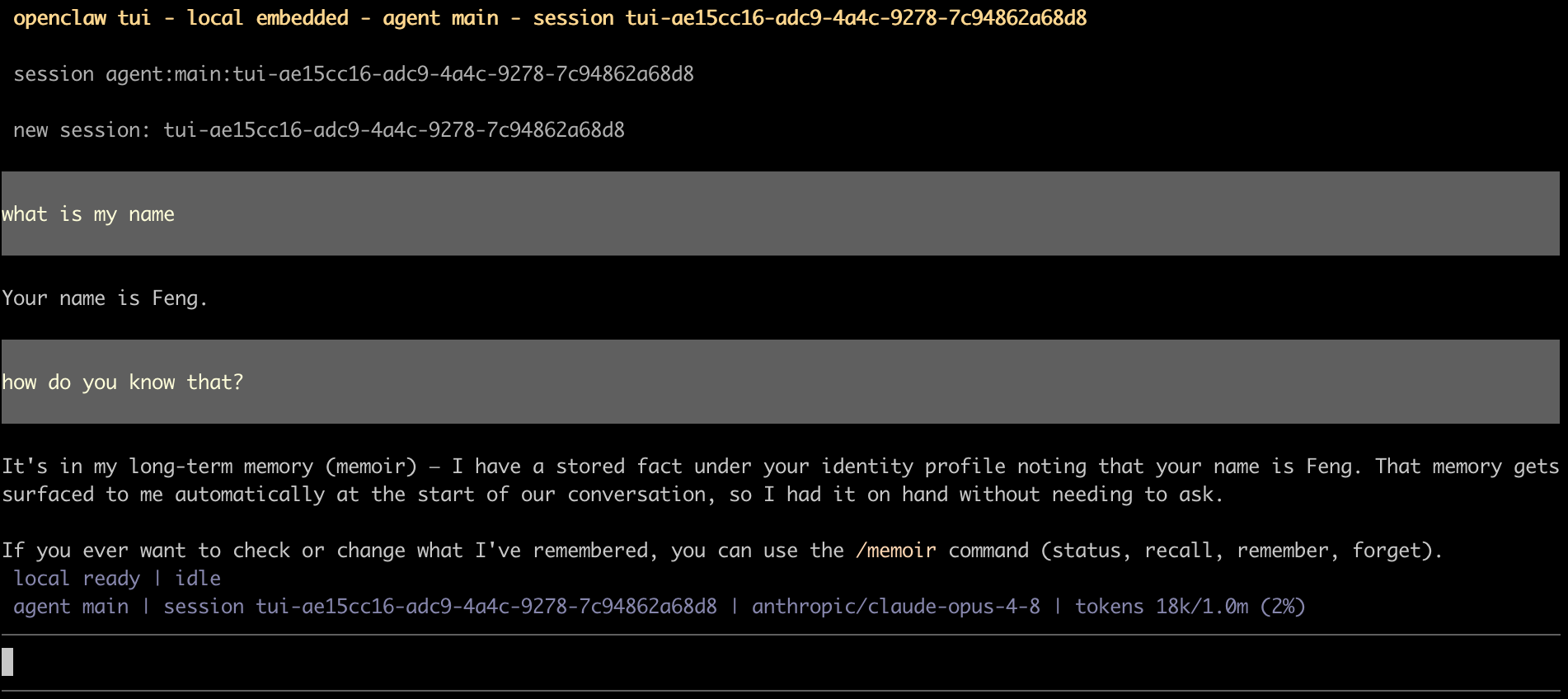
It just remembers — across sessions
You don't manage memory; you talk. Tell OpenClaw your name and it
captures the durable fact in the background after the turn. Start a
fresh session later and it already knows — the fact is surfaced into
the prompt automatically, no tool call required. Under the hood two
tools do the work when the model needs them: memoir_recall
to read stored facts (LLM-free, so it's cheap) and
memoir_remember to write them, classified into a taxonomy
and guarded against secrets.
Scoped memory: the part that matters for a gateway
Here's the feature worth slowing down for. Because OpenClaw can serve
multiple agents and conversations, memoir lets you choose how
wide a memory's reach is, with one config key:
plugins.entries.memory-memoir.config.scope. Three modes:
-
profile(the default) — one memory per agent (profile-<agentId>), shared across all of that agent's sessions. Your assistant remembers you from launch to launch, but one agent's memory never bleeds into another's. -
chat— one memory per conversation (chat-<sessionKey>). Every launch starts clean and nothing carries over — right for shared terminals, one-off threads, or anything you want walled off by default. -
off— a single shareddefaultstore. Every fact is globally visible. Simplest, no isolation — one unified profile.
The isolation is default-deny, and the mechanism is
worth understanding. Captures and memoir_remember write
only to the scoped namespace. Reads
(memoir_recall) look at the scoped namespace plus
the shared default namespace. So a fact learned inside a
scoped conversation stays confined to it, while anything you
deliberately place in default is visible everywhere. Under
the default profile scope the plugin writes nothing to
default — it stays empty — so there's no accidental global
leakage to clean up later.
The practical payoff: a hypothetical you explore in one chat, or facts tied to one persona, can't contaminate every other conversation the gateway is handling. "This conversation's memory" becomes a real boundary instead of a hope.
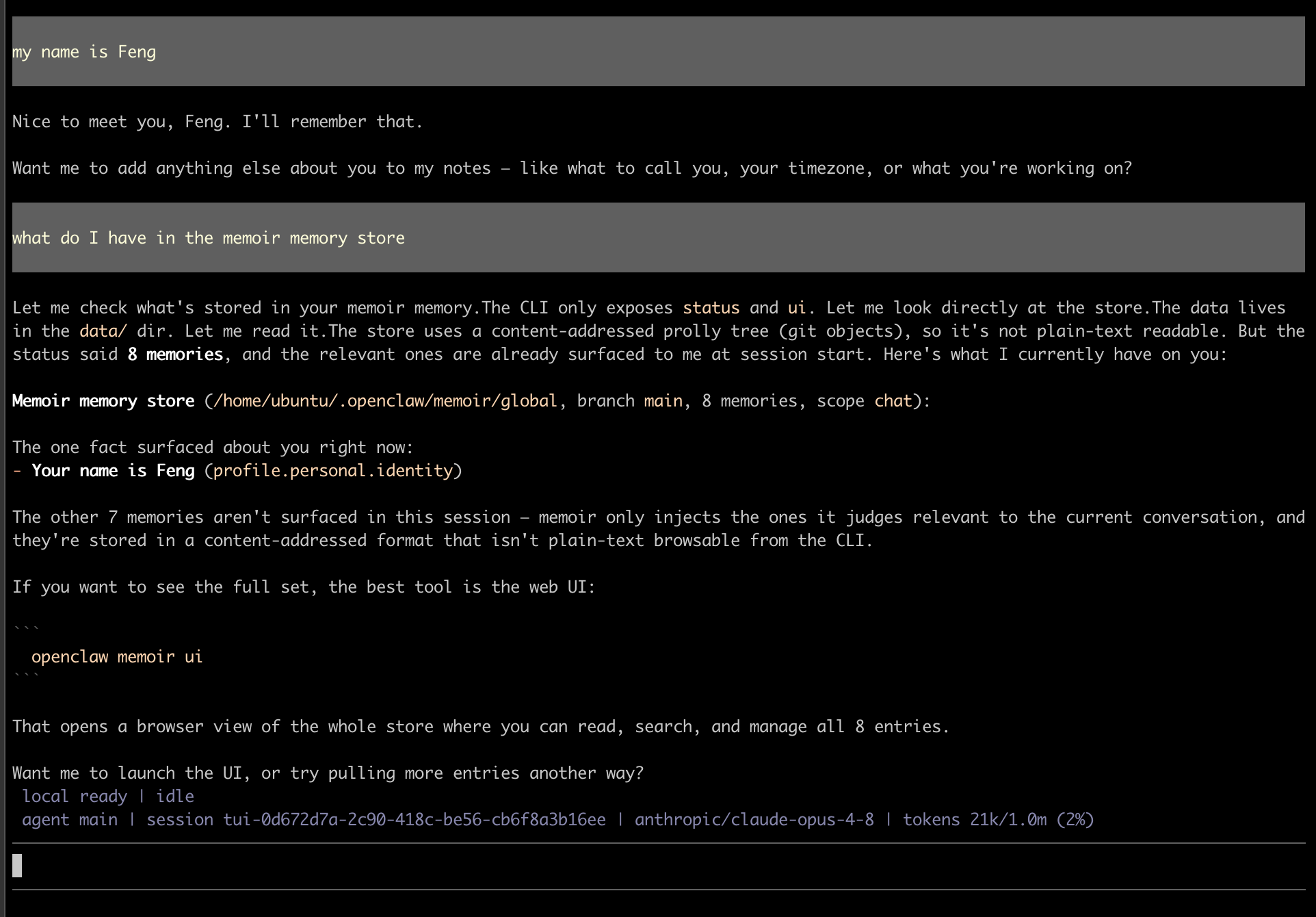
profile).Everything is still a commit
Scope decides where memory lives; memoir's git-like store decides what you can do with it. Every write is an inspectable commit, so the questions that bite long-lived assistants all have answers:
- What's stored, and where?
memoir_statusreports the branch, memory count, and current scope. - Where did this come from?
memoir logandmemoir blametrace any fact to the session that wrote it. - Take it back.
memoir_forgetdeletes by taxonomy path; history stays recoverable. - Branch and merge.
/memoir branch,/memoir checkout, and/memoir syncdiverge a timeline and fold it back when you choose.
All of it is reachable in chat through the /memoir command
(status, recall, remember,
forget), and openclaw memoir ui opens a visual
browser over the whole store.
Getting started
It's a one-time setup on the gateway host:
- Install the memory tool:
pip install memoir-ai - Install the plugin:
openclaw plugins install https://github.com/zhangfengcdt/openclaw-memoir - Allow conversation access:
openclaw config set plugins.entries.memory-memoir.hooks.allowConversationAccess true - Restart the gateway:
systemctl --user restart openclaw-gateway
Leave scope on profile for a personal
assistant that remembers you between launches, or set it to
chat when each conversation should stand alone. Verify any
time with openclaw memoir status.
A gateway's memory shouldn't be all-or-nothing. Scope makes "remember this for me" and "keep this to this conversation" two different, deliberate choices — and the store stays inspectable either way.