
See what your agent just remembered: /memoir:pane
Memoir's auto-capture runs after every turn, and until now you couldn't see it happen. The Claude Code plugin's first mod puts a live memory count under the prompt and a pane beside the transcript, where you can compare a branch's memories with main and forget, restore or merge them without leaving the session.
The problem: memory you can't see
Memoir's Claude Code plugin captures memories on its own. When a
turn ends, the Stop hook reads the transcript, decides
what is worth keeping, and commits it to the store. It runs in the
background so it never slows the session down, which also means its
writes land a few seconds after the turn, with nothing on screen to
say they happened.
Finding out what was stored meant going to look:
/memoir:status, the CLI, or the web UI. Most people
didn't, and memory nobody looks at is memory nobody corrects. A
wrong preference captured on Monday is still steering the agent on
Friday.
Branches add a second question. Memoir gives every code branch its
own memory branch, so a feature's captures stay isolated until you
promote them. Before promoting, you want to know what is different
from main, and there was no quick way to see that
either.
A count under the prompt
The smallest part of the change is one line. The hint line under the prompt now ends with the store's state:
memoir: feature/auth · 18 memories · +2 this turn +2 this turn appears once the turn's captures have
landed and clears when the next turn starts. Metric writes don't
count toward it. There is nothing to configure: the old status-line
widget needed a hand edit to ~/.claude/settings.json,
which most people never made. If you did make it, the plugin notices
and skips its own line so the state isn't shown twice.
The pane: three tabs
/memoir:pane opens a pane. In a wide fullscreen
terminal it docks beside the transcript; otherwise it sits above the
prompt. ctrl+x tab focuses it and
ctrl+x x closes it.
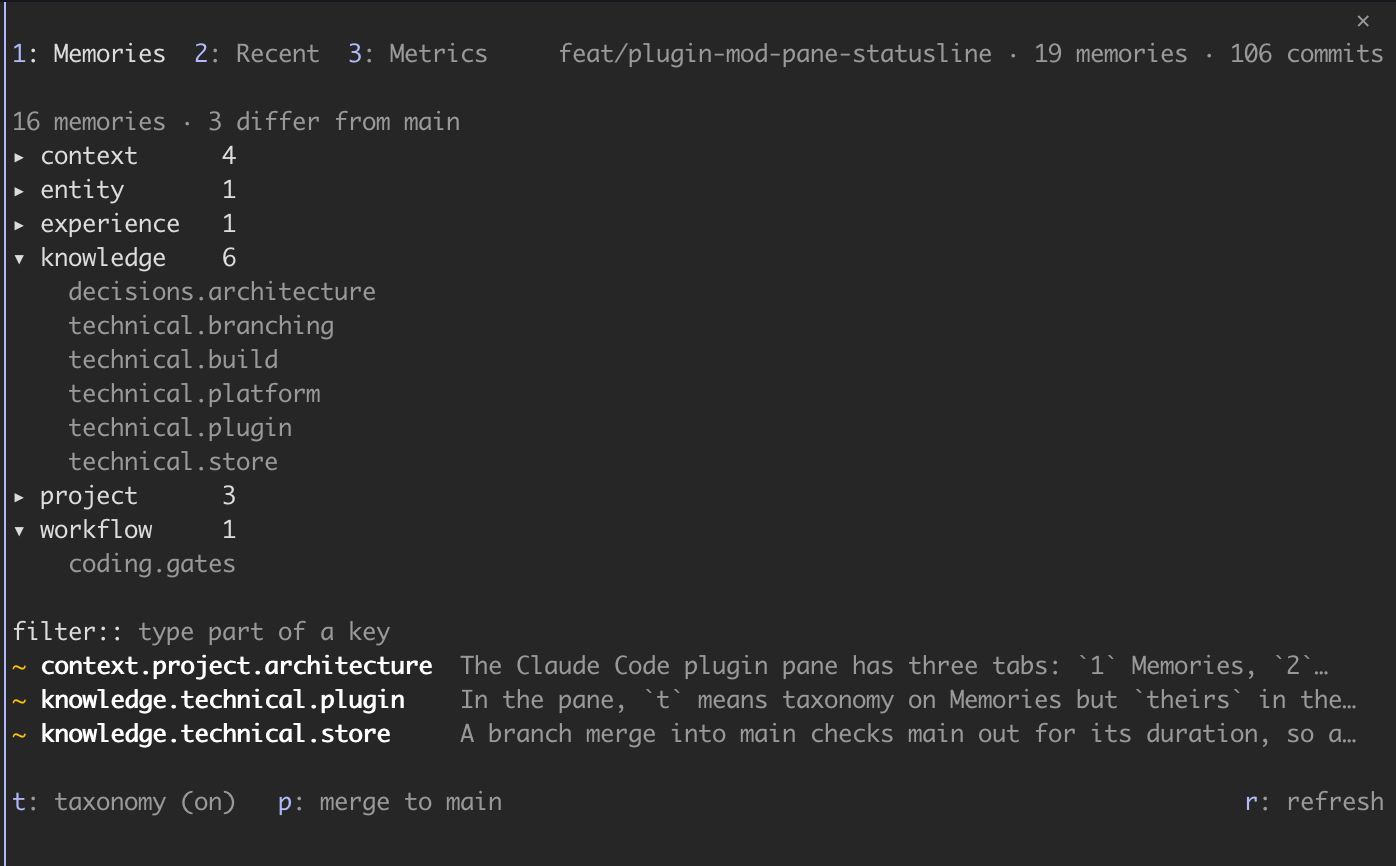
- Memories (the default) answers the branch
question. On a feature branch it lists only the keys that differ
from
main, each marked+(new on this branch),~(changed here) or-(on main only, forgotten here), with one line of its value. Open a changed key and main's value sits beside the branch's. From there you can forget the key on this branch or restore main's value, each behind a confirmation.pmerges the whole branch intomainand asks how to settle keys changed on both sides: keep main's value, take the branch's, or keep both by appending one to the other. Afilter:field narrows the list, andtshows the taxonomy above it. - Recent is the capture feed: the store's last 20
or so commits, newest first, with
●marking the ones from this turn. Open one to see what it changed, each key's value before and after. Metric writes are hidden until you pressm. - Metrics draws one bar chart per metric across your branches (turns, tool calls, tool errors, average latency, output size), with the current branch first. The figures are the same ones the web UI's Metrics tab shows.
The pane only writes what you confirm in it, and it writes through
the same memoir CLI the hooks use. Nothing about how
capture works has changed; the four shell hooks, the skills and
every existing command are untouched.
Getting it
- Update the Memoir plugin and run Claude Code 2.1.287 or newer. The count under the prompt appears on its own;
/memoir:paneopens the pane. - On older Claude Code versions,
/memoir:paneprints a plain-text summary of the store and the latest captures instead.
See the pull request on GitHub
Auto-capture earns trust only when you can watch it work. Now it happens on screen, one turn at a time.