
Claude Code plugin now supports memoir:sync for guided branch promotion
Memory branches track your code branches, so captures pile up on feature branches until someone promotes them. Plugin v0.3.0 ships /memoir:sync: an interactive flow that previews, merges, snoozes, or prunes memoir branches — plus auto-promotion when your code branch merges into main.
The problem: memories stranded on feature branches
Memoir's memory branches auto-track your code branches. Work on
feature/a and your captures land on
memoir/feature/a — isolated, exactly as they should be
while the work is in flight. But when the code merges and you move
on, those memories don't follow automatically. They sit on the
memoir branch, invisible to main, accumulating across
every feature you've ever touched.
Until now the fix was CLI plumbing: memoir unmerged to
find the branches, memoir sync-branch to promote each
one. It worked, but nobody remembered to do it.
The fix: a guided flow inside the session
Plugin v0.3.0 replaces that plumbing with one slash command.
/memoir:sync scans the store, lists every memoir branch
with memories not yet on main, and walks you through
what to do with them via Claude Code's native select UI:
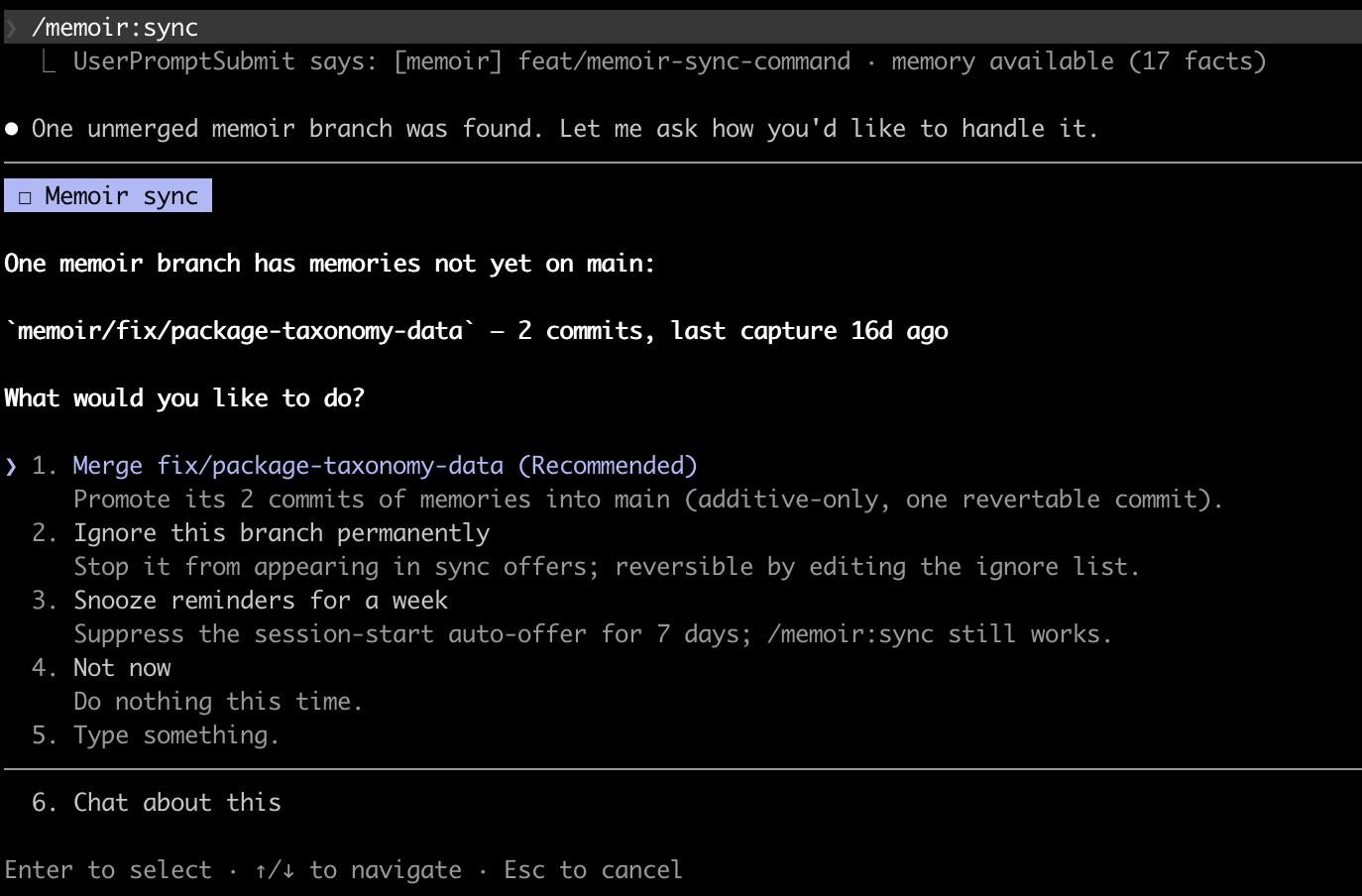
- Merge — promote a branch's memories into
main. You see a dry-run preview first (+N new keys, M updated), then it applies. No second confirmation needed: the promote is additive-only — it never deletes keys, so there are no conflicts — and it lands as one revertable commit. - Ignore — stop a branch from ever appearing in sync offers. Reversible by deleting one line from the store's ignore list.
- Snooze — suppress the session-start reminders
for a week.
/memoir:syncitself keeps working. - Delete — clean up stale branches (inactive 60+ days and already synced, or their code branch is gone). Always behind an explicit pick, and the flow flags any branch whose unmerged commits would be discarded.
Power users can skip the questions entirely:
/memoir:sync feature/x merges that branch directly.
Here's the full flow in motion:
Most of the time, you won't even run it
The command is the manual entry point, but two automatic mechanisms mean the common case handles itself:
- Auto-promotion on merge. When your code branch
lands in
mainvia a merge commit, the next session onmainpromotes its memoir branch automatically and notes it in the status line. The work unit is done; the memories follow. (Squash- and rebase-merges aren't detectable this way — those fall through to/memoir:sync.) - A gated offer, not a nag. Once unmerged work reaches five commits, the session start surfaces a one-time sync offer. Decline it and the reminder backs off automatically — one day, then seven, then thirty. The status-line count stays visible either way, so the state is never hidden, just quiet.
The short list
/memoir:sync— interactive promotion of unmerged memoir branches: merge all, choose, ignore, snooze, or delete- Dry-run preview before every merge; additive-only, one revertable commit
/memoir:sync <branch>— direct merge, no questions- Auto-promotion at session start when the code branch merged into
main(disable withMEMOIR_AUTO_PROMOTE_MERGED=0) - Gated session-start offer at ≥5 unmerged commits, with escalating back-off on decline
- Stale-branch cleanup with per-branch risk flags (
MEMOIR_STALE_BRANCH_DAYSto tune)
See the feature commit on GitHub
Branch isolation is only useful if promotion is effortless. v0.3.0 makes the second half true.